Websites
Limo website design that turns visitors into bookings
Where to put the booking form, how to design for phones, what fleet photos to use, honest trust signals, the pages every limo site needs, and the mistakes that quietly cost you rides.
EazyLimo Team 7 min read
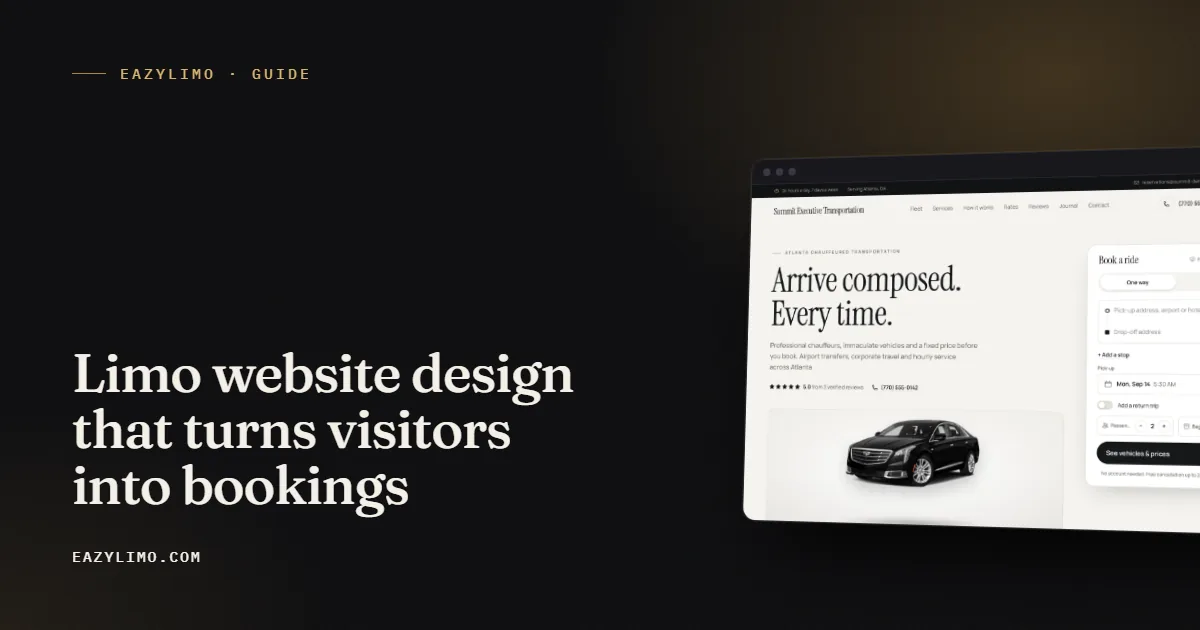
A limo website has one job: turn a person who needs a ride into a confirmed booking. It is not a brochure, and it is not there to win design awards. Most visitors arrive with a specific trip in mind, often on a phone, often in a hurry. The design choices that matter are the ones that get them from "I need a car to the airport on Friday" to a confirmation email with the fewest possible taps.
This article covers the decisions that make the biggest difference for small operators, from where the booking form sits to the mistakes that quietly send customers to someone else.
Start with what your visitors want
Think about the people who actually land on your site. A traveler booking an airport pickup for next week. An assistant arranging a car for an executive. A couple planning a wedding exit. A parent booking a prom ride. They want four things answered quickly:
- Do you serve my area and my airport?
- What kind of vehicle will show up?
- How much will it cost?
- Can I trust you to be there on time?
Every section of your site should answer one of those questions. If a block of content does not, it is probably slowing people down.
Put the booking form above the fold
The most common layout problem on limo websites is a huge hero photo with a small "Book Now" button that leads to a contact form. That adds a step, and every extra step loses some customers.
Instead, put a real booking form at the top of the home page, visible without scrolling on a phone. Keep the first step short:
- Service type: point to point, hourly, airport or round trip.
- Pickup address, with autocomplete so nobody types a full street address.
- Drop-off address.
- Date and time.
- Number of passengers.
Show the price or the vehicle options next. Ask for the name, phone, email, flight number and payment details only after the customer has seen what the trip costs. People are far more willing to type their details once they know the answer to the price question.
Make the form fit your services
Airport bookings should ask for the airline and flight number. Hourly bookings should show your minimum hours. Round trips should collect the return time on the same form. If you allow extra stops, let the customer add them right there rather than writing a note. A form that matches how you work saves you follow-up calls.
Design for the phone first
Your customers book from phones in airports, taxis, offices and hotel lobbies. Design the mobile version first and treat the desktop layout as the bigger version of it, not the other way round.
- Use large tap targets for buttons and date pickers.
- Keep a tap-to-call phone number in the header for people who prefer to talk.
- Avoid pop-ups that cover the booking form.
- Use readable text sizes so nobody has to pinch and zoom.
- Test the whole booking flow on your own phone, on mobile data, before you launch.
If you run a single vehicle and want to see how online booking changes your week, read online booking for a one-car limo business.
Fleet photos that sell the ride
Photos do a lot of the selling on a limo site. A customer paying for a premium ride wants to see the car that will pick them up.
What to photograph
- The exterior from the front three-quarter angle, freshly washed.
- The rear seating area, showing legroom and finishes.
- The trunk or cargo space with luggage, so travelers know their bags will fit.
- Details customers care about, such as charging ports, water or a partition.
How to shoot it without a photographer
A recent phone camera is fine. Shoot in open shade or early evening light rather than harsh midday sun, park against a clean background, and turn off the interior dome light glare. Take far more shots than you need and pick the best few. Then compress the images before uploading so they do not slow the site down.
Give each vehicle its own page with passenger count, luggage capacity and the services it suits. That page helps customers choose and gives Google something specific to show when someone searches for your vehicle type in your city.
Trust signals that are honest
Trust is what separates a booking from a bounce, especially for a small company the customer has never heard of. The good news is that honest trust signals work well. The bad news is that fake ones can backfire badly.
Use these
- Real reviews. Show your Google reviews and any reviews customers have sent you directly, with their permission.
- Your real photos. Your own vehicles, and a photo of you or your chauffeurs if you are comfortable with it.
- Clear policies. A visible cancellation policy, terms and privacy page tell customers you run a proper business.
- Licensing and insurance details that apply in your area, stated accurately.
- A real address and phone number that match your Google Business Profile.
- Straightforward pricing. A rates page or instant quote shows you have nothing to hide.
Avoid these
- Invented testimonials or reviews copied from elsewhere.
- Logos of companies you have not actually worked for.
- Inflated claims like "thousands of happy clients" when you are just starting out.
- Stock photos of vehicles you do not own.
A new operator with three genuine reviews and honest photos looks more trustworthy than a site full of claims nobody believes. Your Google profile is part of this picture too, so see our guide to Google Business Profile for limo companies.
The pages every limo site needs
Each page should have a clear purpose, a unique title and description, and a path back to the booking form. Here is a practical page list for a small operator.
| Page | What it does |
|---|---|
| Home | Booking form above the fold, a short summary of services, fleet preview and reviews. |
| Fleet and vehicle pages | Show each vehicle with photos, passenger and luggage capacity. |
| Services | Airport transfers, hourly, weddings, corporate, events and any other work you want more of. |
| Airport pages | One page per airport you serve, with pickup details and a booking form. |
| City or area pages | One page per town or area you cover, written specifically for that place. |
| Rates | Your pricing approach, sample flat routes or hourly minimums. |
| Reviews | Real customer reviews in one place, plus a link to leave one. |
| Blog | Useful local content that answers customer questions. |
| FAQ | Wait times, luggage, child seats, payment, gratuity and cancellations. |
| Contact | Phone, email, service area and a simple contact form. |
| Terms, privacy, cancellation policy | The rules of doing business with you, written clearly. |
Airport and city pages are where many small operators pick up search traffic, but only if each page is genuinely about that place. Copying one page twenty times with the city name swapped rarely helps. Our limo SEO basics guide explains how to write them.
Speed and the technical basics
A slow site loses people before they see the form. Speed also affects how Google treats your pages. You do not need to be a developer to get the basics right.
- Compress and resize every photo before upload.
- Skip autoplay video backgrounds and heavy image sliders.
- Limit third-party chat widgets and tracking scripts to what you really use.
- Give every page a unique title and meta description.
- Add structured data so search engines understand your business and services.
- Submit a sitemap so new pages get discovered.
- Use HTTPS on every page, especially the checkout.
Common limo website mistakes
These show up again and again on small operator sites. Each one costs bookings.
- Contact form instead of booking. Asking people to "request a quote" and wait for a reply sends impatient customers elsewhere.
- No prices anywhere. You do not have to publish every rate, but customers need some idea of cost before they commit.
- An outdated copyright year and old photos. Small signs of neglect make visitors wonder whether you are still in business.
- Phone number hidden in the footer. Put it in the header and make it tappable.
- One page for everything. A single long page gives Google little to rank for airports, cities or services.
- Missing policies. No cancellation policy means arguments later and less trust now.
- Never testing on a phone. Many sites look fine on a laptop and are frustrating on a phone.
A quick pre-launch checklist
- Book a test ride on your phone from start to confirmation email.
- Check that the new-booking alert reaches you.
- Make a test card payment and confirm it lands in your own account.
- Read every page aloud once to catch errors.
- Confirm the address and phone match your Google profile.
- Check that every page has its own title and description.
Getting a site like this without building it yourself
If you would rather drive than design, EazyLimo builds this kind of site for you: booking form above the fold, fleet and vehicle pages, airport and city pages, reviews, policies and fast, SEO-ready pages, set up from your logo, photos and rates. Pay once and you own it (founding price $499 for the first 25 operators, then $999), or pay $79 a month. See every part of it working on the demo operator site.